
How to expand PS5 storage: M.2 SSD or external USB drive, requirements and installation
2026-11-03 · Guides
Short answer: there are two ways to add storage to a PS5. An M.2 SSD inside the console can both store and run PS5 games. An external USB drive is cheaper, but it can only store PS5 games, and only PS4 games can be played from it. If you download a lot of new games, get a 1–2 TB M.2 drive with a heatsink.
How much space you really have
The original PS5 has an 825 GB drive, the PS5 Slim has 1 TB and the PS5 Pro has 2 TB. The system takes up some of it, so you get less: about 667 GB on the original PS5. Big games take 100–150 GB or more, and updates add to that. To see what's using your space: Settings → Storage → Console Storage.
Option 1: an M.2 SSD inside the console
This is the official expansion slot, which Sony enabled in a system update. A drive in this slot is almost as fast as the built-in one, and PS5 games run directly from it.
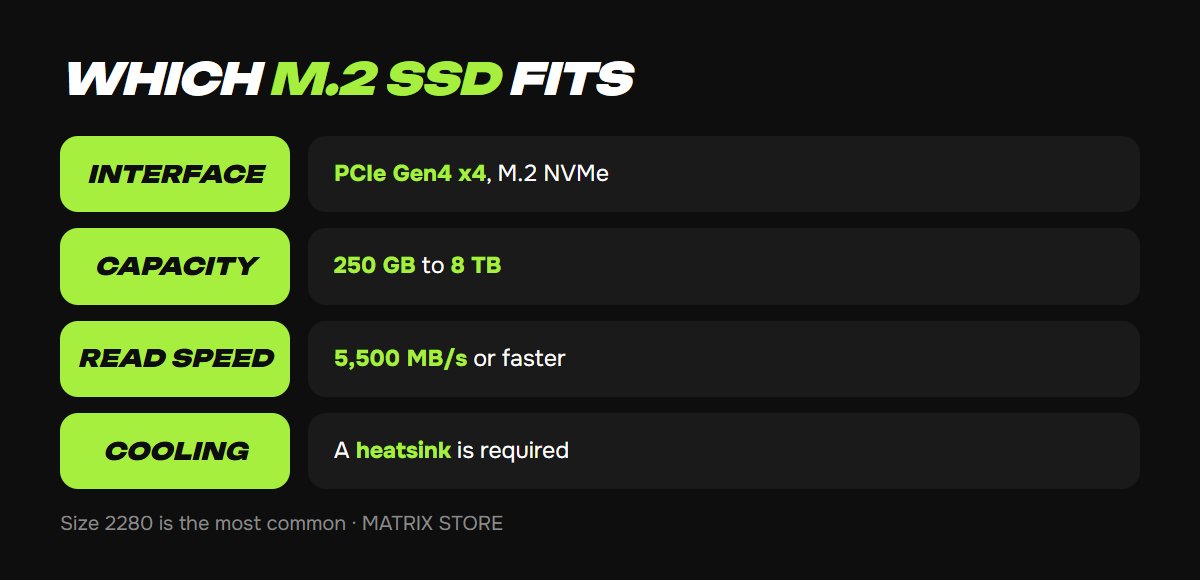
Sony's drive requirements:
- Interface: PCIe Gen4 x4, M.2 NVMe (Key M). M.2 SATA drives won't work.
- Capacity: 250 GB to 8 TB.
- Read speed: 5,500 MB/s or faster recommended.
- Size: 2230, 2242, 2260, 2280 or 22110. Almost all drives are sold as 2280.
- Cooling is required: a heatsink or heat-transfer plate. With it, the drive can be up to 25 mm wide and 11.25 mm thick.
PCIe Gen5 drives also fit, but they won't run any faster because the slot is designed for Gen4. If a drive already has a heatsink, don't add a second one. To be fair, Sony says that even a drive that meets every requirement isn't guaranteed to work with every console, so buy a well-known model and keep your receipt.
How to install an M.2 SSD, step by step
You'll need a Phillips screwdriver (Sony specifies a 4 mm shaft) and a well-lit table. Update your PS5 system software to the latest version first.
1. Turn your PS5 completely off (not rest mode), unplug all cables and let the console cool down.
2. Remove the cover. On the original PS5 (CFI-1000 models), that's the white side panel. On the PS5 Slim and PS5 Pro (CFI-2000 and CFI-7000), it's a small triangular cover on the side.
3. Unscrew the expansion slot cover and remove it.
4. Move the spacer to match the drive's length: mark "80" for a 2280 drive.
5. Insert the drive into the connector at an angle until it stops, press it down and secure it with the screw.
6. Put the slot cover and console panel back on, plug in the cables and turn on your PS5.
7. The console will offer to format the drive. Formatting erases everything on it and must not be interrupted, so don't turn off the power.
After formatting, your PS5 will show the drive's read speed. New games can go straight to the M.2 drive: Settings → Storage → Installation Location. To move games you've already installed, go to your Game Library, select a game, press the options button and choose Move Games and Apps.
Made room? Time to fill it up. Find PS5 games in our catalog and on sale, paying with USDT.
Option 2: an external USB drive
A regular external HDD or SSD will work if it connects over USB 5 Gbps or faster and holds 250 GB to 8 TB. Plug it directly into the console, because the drive won't work through a hub. A PS5 uses only one such drive at a time.
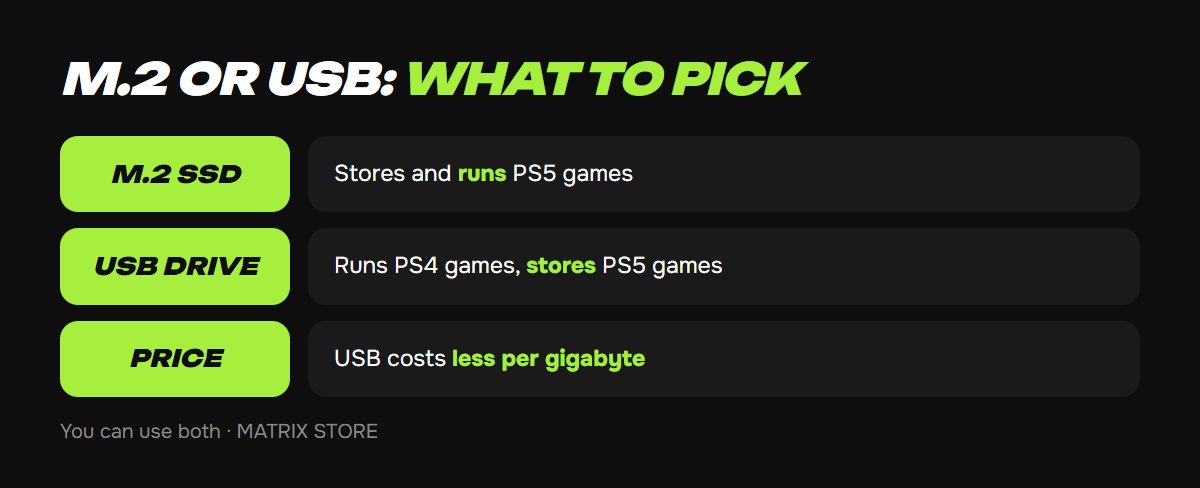
What you can do with it:
- PS4 games: install and run them directly from the USB drive.
- PS5 games: store them only. Before playing, you have to copy them back to the internal storage or the M.2 drive. Copying is faster than downloading them again.
A drive already used as extended storage on a PS4 or another PS5 doesn't need to be formatted again.
Which to choose
- You play new PS5 games and change them often: a 1–2 TB M.2 SSD.
- You have lots of older PS4 games or want a "warehouse" to avoid downloading again: a USB drive, which is cheaper per gigabyte.
- You can also use both: M.2 for the games you're playing, USB for the rest.
FAQ
Do I need to format the SSD if I move it to another PS5? No. Sony says no formatting is needed when moving a drive between two PS5 consoles.
Will installing an M.2 drive delete the games on my console? No. Only the new drive gets formatted, and the internal storage isn't touched.
Can I install an M.2 drive without a heatsink? Sony explicitly says no: without cooling, the drive overheats. Get a model with a heatsink or buy a heatsink separately that fits the slot's dimensions.
Don't want to deal with it?
We'll pick a game and buy it on your Turkish or Ukrainian account, or set up PS Plus. Pay with USDT. Questions? Message our manager on Telegram or WhatsApp.