
Play video and music from a USB drive on PS5: supported formats, exFAT vs. FAT32, where Media Gallery is, which discs the drive plays and Spotify in the background
2026-11-04 · Guides
A downloaded show, a concert recording or your own music library can play on the TV through your PS5. The catch is that the player is picky about codecs, the drive has to be formatted a specific way, and the app isn't where most people look for it. Here's Sony's list plus the workarounds for files that don't fit.
Formats the PS5 plays
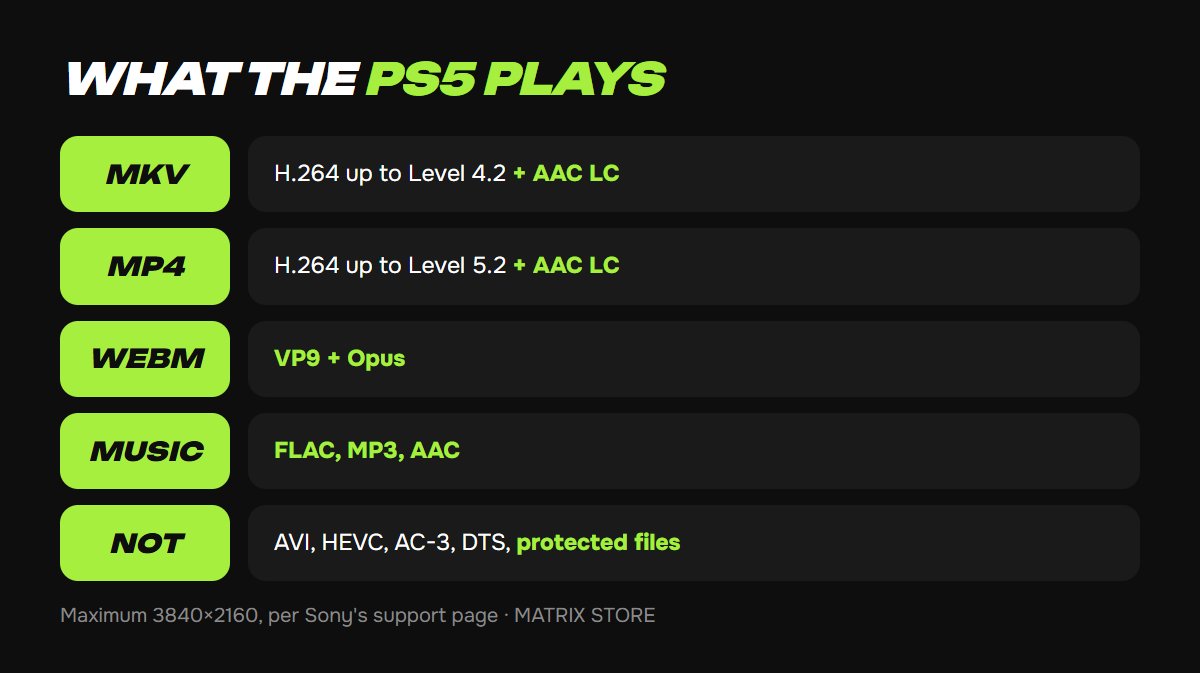
Sony's official list for USB video on PS5:
- MKV: H.264/MPEG-4 AVC High Profile up to Level 4.2, AAC LC audio.
- MP4: H.264 High Profile up to Level 5.2, AAC LC audio.
- WEBM: VP9 video, Opus audio.
Maximum resolution is 3840 × 2160. AVI, MPEG-2 and AVCHD appear only in the PS4 list; the PS5 doesn't play them. Media Gallery won't play copyright-protected files.
Music: FLAC, MP3, AAC. DRM-protected tracks won't play.
The usual trap: the container is right but the codec inside isn't. An MKV with HEVC (H.265), 10-bit video or AC-3 or DTS audio shows up in the list and refuses to play. The fix is to re-encode it on a computer to H.264 plus AAC with any free converter.
Preparing the drive
1. Format the drive as exFAT (needed for files over 4 GB) or FAT32. NTFS isn't recognized; the console reports that the drive's file system is unsupported.
2. For video, create a folder in the root of the drive and put the files in it. For music, Sony requires the folder to be named Music.
3. Plug the drive straight into the console, not through a hub.
A drive the console formatted as extended storage for games can't hold movies. Use a separate flash drive for media.
Where the player is on PS5
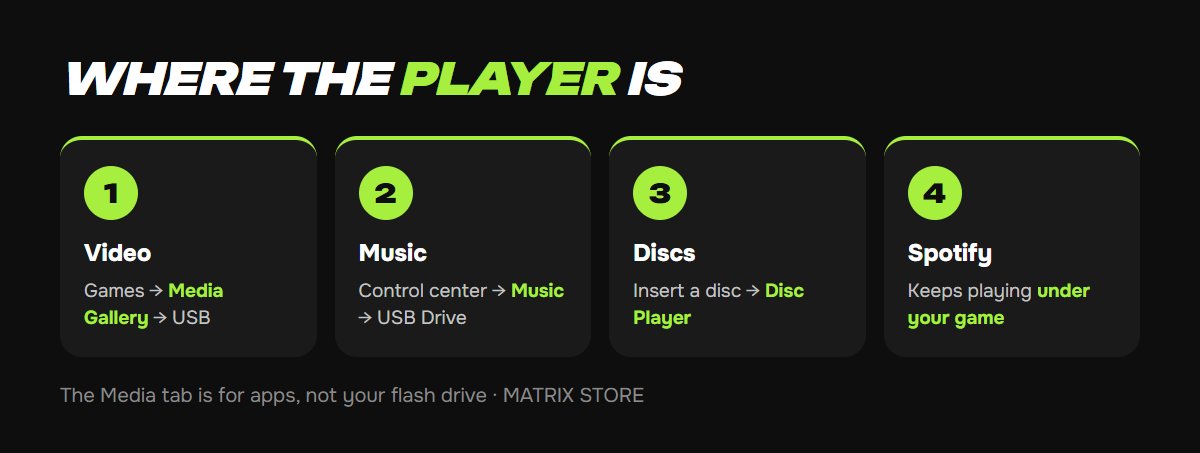
Video: home screen → Games tab → Media Gallery → USB. The Media tab next to Games is for apps like YouTube and Netflix, not for your flash drive.
Music: press PS → in the control center select Music → USB Drive. It keeps playing under your game and is controlled from the same card.
Discs: on models with a drive, insert a Blu-ray or DVD and Disc Player appears on the home screen. The PS5 plays Ultra HD Blu-ray, BD-ROM, BD-R/RE, DVD-ROM, DVD-R/RW and DVD+R/RW. Audio CDs don't play: Sony lists CD among unsupported discs. The 2020 Digital Edition has no drive at all; the 2023 Digital Edition and the PS5 Pro accept Sony's add-on disc drive. More in which PS5 to buy.
Movies covered? For games, Matrix Store has titles for your own account and Game Sharing options.
Spotify while you play
Spotify is a separate app from the PlayStation Store. According to Spotify's support page, playback continues while you game, and a card appears in the control center for pause, skip and volume. Your phone works as a remote through Spotify Connect. Spotify's own tip: turn off the game's music so the two don't overlap. To unlink the service later, go to Settings → Users and Accounts → Linked Services.
When it doesn't work
- The drive isn't detected. Check the file system, exFAT or FAT32 only, and try another port.
- The file is listed but won't play. The codec isn't on the list. Re-encode to H.264 plus AAC.
- No subtitles. Sony doesn't document external subtitle files, so burn subtitles into the video when you convert it.
- A disc won't start. Check the disc's region, and never insert 8 cm or non-round discs; Sony warns they can damage the console.
- 4K video stutters. Lower the bitrate or use a faster USB 3.0 drive.
Don't want to deal with it?
We'll help you pick a game for your own account or through Game Sharing and give you setup tips. Pay with USDT. Questions? Message us in the bot @matrix_eng_bot or our manager on Telegram.