
How to make a PS5 or PS4 your primary console, so games from another account run on your own profile
2026-11-03 · Guides
Short answer: on PS5, turn on Console Sharing and Offline Play for the account the games were bought on. The path is Settings → Users and Accounts → Other → Console Sharing and Offline Play → Enable. On PS4, the same thing is called "primary PS4". After that, games and PS Plus from that account work for all profiles on the console, even offline. This is especially handy if you buy games on a Turkish or Ukrainian account: you can play them on your own US profile, with your own trophies and friends.
Why you need it
A digital game is tied to the account it was bought on. That account can launch it on any console with an internet connection, because the PS5 checks the license on a server. A primary console removes two limits:
- Other profiles on the console can launch your games too, such as your main account with your trophies or your child's account.
- No internet needed. Games launch offline, even when PSN is down.
Many players use this setup: their main account stays the one they play on, and a separate Turkish or Ukrainian account is used for purchases. They add that account to the PS5, turn on sharing for it, and its games open on their main profile.
Where to turn it on: PS5 and PS4
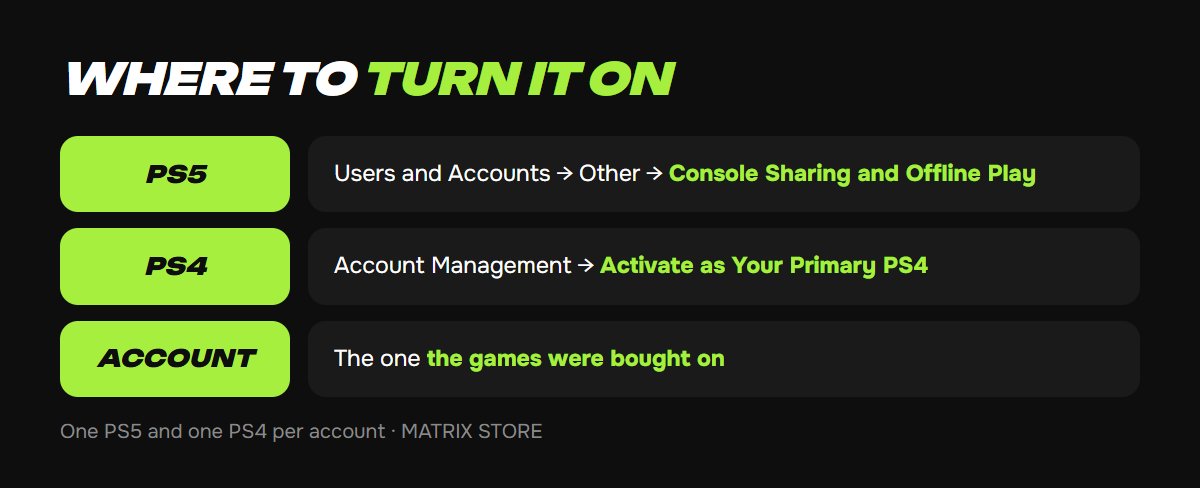
PS5:
1. Sign in on the console to the account the games were bought on (home screen → your avatar → Switch User → Add User).
2. Open Settings → Users and Accounts → Other → Console Sharing and Offline Play.
3. Select Enable. If it already says "Don't Disable", the feature is on for this PS5.
PS4:
1. Sign in to the account with the games.
2. Open Settings → Account Management → Activate as Your Primary PS4.
3. Select Activate.
Turn it on from the account the games or subscription were bought on. You don't need to do anything on your main profile.
How many consoles, and what other profiles get
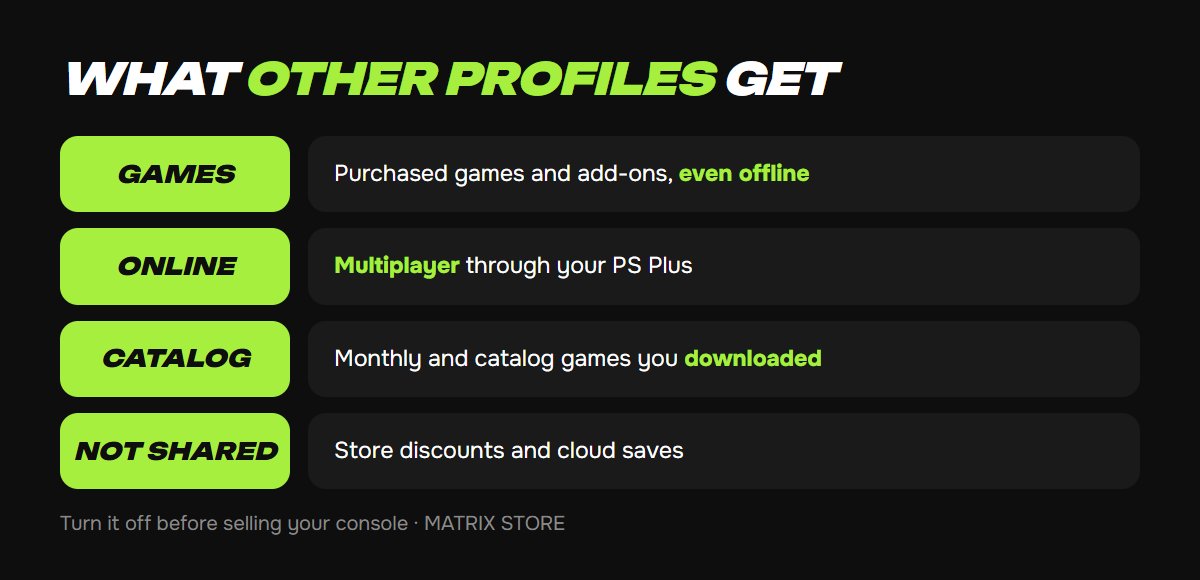
One account can have one PS5 with sharing on and one PS4 as its primary console at the same time. The feature turns on automatically on the first PS5 you sign in on.
According to PlayStation, other users on that console get:
- games and add-ons you bought, including offline;
- online play through your PS Plus (subject to parental controls);
- downloaded PS Plus monthly games and Extra and Deluxe catalog games, if your plan includes them;
- games bought with a PS Plus discount.
What isn't shared: PS Plus store discounts, cloud storage for saves, automatic updates and early access to trials. You can't share a subscription with a friend's console, because the feature only works on your own two consoles.
We buy games on your Turkish or Ukrainian account and help you set up your primary console so everything runs on your own profile. See PS5 Games for more.
How to move activation to a new console
1. On the old PS5, open the same setting and select Disable. On PS4: Settings → Account Management → Activate as Your Primary PS4 → Deactivate.
2. On the new PS5, sign in to the account and turn on sharing.
Don't have the old console anymore (sold it, broke it)? Sign in to your account settings at playstation.com and, in device management, choose Deactivate All Devices. You can only do this once every 6 months, so don't waste it. Then turn on sharing on the new console.
Always turn off sharing before selling a PS5 or PS4, or the buyer will be able to play your games.
Common problems and fixes
- "Can't use this content" or a lock on the game icon. Restore your licenses: on PS5, Settings → Users and Accounts → Other → Restore Licenses; on PS4, Settings → Account Management → Restore Licenses. This doesn't delete anything.
- A game only works on the account it was bought on. Sharing is off on this console or on for a different PS5. Check the setting from the account with the games.
- It says the feature is already on for another console. Turn it off there, or deactivate all devices on the website.
- A PS Plus monthly game won't launch for a second profile. It first has to be downloaded on the console from the account with the subscription, and the subscription has to be active.
- Everything stopped working after a PS5 reset. A reset removes the activation. Sign in to the account with the games and turn on sharing again.
FAQ
Can I turn it on for a friend's PS5 so they can play my games? Technically yes, but then on your own PS5 the games will only run online and only on your account. To turn the feature on, you'd also have to sign in to your account on their console. Only do this with someone you fully trust, and change your password afterward.
Which profile do trophies go to? The one you're playing on. That's why buying on a Turkish account and playing on your own profile is so popular.
Do I need to keep the Turkish account on the console? Yes, don't delete it, because licenses are checked through it. Just don't play on it.
Is this the same as game sharing? The mechanism is the same. With P3 Game Sharing, sharing is turned on for a shared account on your PS5.
Quick checklist
- Turn on sharing from the account the games were bought on.
- One PS5 and one PS4 per account.
- Turn the feature off before selling a console.
- Deactivate All Devices on the website works once every 6 months.
- Lock on a game? Try Restore Licenses first.
Don't want to deal with it?
We'll buy a game or PS Plus on your account and show you how to set up your primary console. Pay with USDT. Questions? Message our manager on Telegram or WhatsApp.