
How to cancel PS Plus auto-renewal on PS5, PS4, in a browser and in the PS App
2026-11-03 · PS Plus
PS Plus renews automatically until you turn off auto-renewal. That's handy when you play all the time, and annoying when you're charged for a month you never turned your console on. You can cancel in a minute from any device. Below are all the paths from Sony's official instructions, plus answers to the questions that come up afterward.
The main rule
After you cancel, your subscription doesn't stop right away: Sony says it "will be deactivated from the next payment date". In other words, you use up the period you paid for, and there are no new charges. So it pays to cancel as soon as you decide, since you lose nothing. You can cancel at any time before the next payment date.
Where to cancel
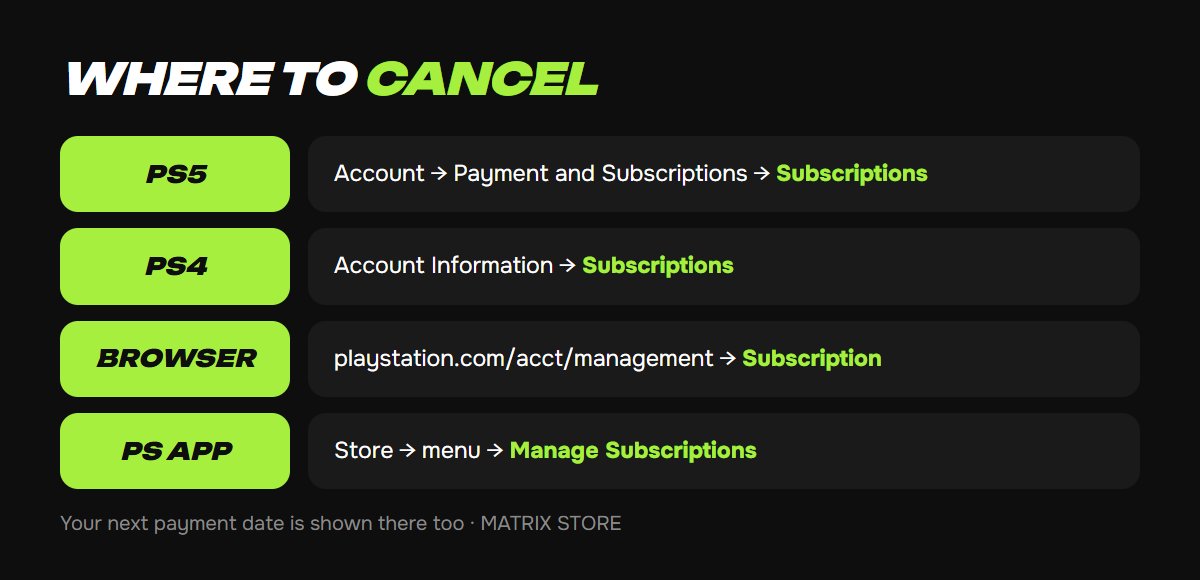
1. On PS5: Settings → Users and Accounts → Account → Payment and Subscriptions → Subscriptions → PlayStation Plus → Cancel Subscription. For some subscriptions, the option is in the neighboring Game and App Services section and is called Turn Off Auto-Renew.
2. On PS4: Settings → Account Management → Account Information → Subscriptions → PlayStation Plus → Cancel Subscription.
3. In a browser: sign in at playstation.com/acct/management, choose Subscription in the left menu, then Cancel under PlayStation Plus. Changed your mind? Resume Subscription will appear in the same place.
4. In the PS App on your phone: the PlayStation Store icon at the bottom → menu at the top right → Manage Subscriptions → Cancel.
In any of these places, you can also see your next payment date and plan. Check it so you know when your subscription runs until.
Can you get a refund
Under the PlayStation Store cancellation policy, you can cancel a subscription with a refund within 14 days of purchase, even if you've already used it. The amount may be reduced in proportion to the days used: in your transaction history, it appears as a full refund and a charge for the period used. A free trial counts toward those 14 days. After 14 days, there's no refund for payments already made; you can only turn off future ones. Requests go through Sony support, and you'll need your Online ID, sign-in email and the name of the purchase. See PS Store refunds for details.
What happens when it ends
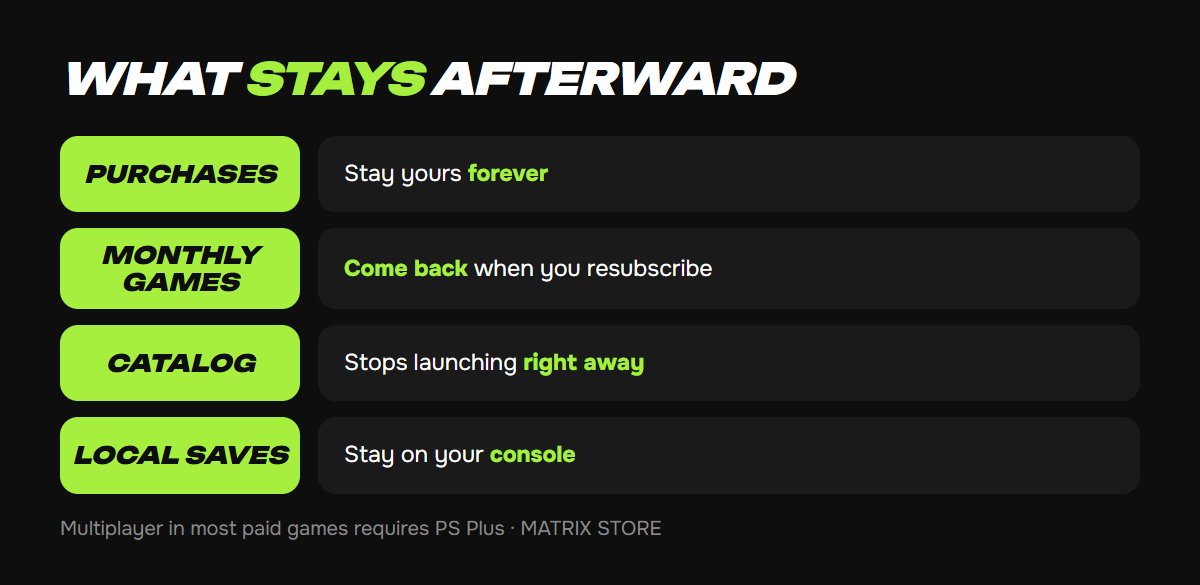
- Monthly games (Essential) disappear from your library but aren't deleted for good: when you resubscribe, everything you ever added is available again.
- The Extra/Deluxe catalog: games stop launching as soon as your subscription ends.
- Purchased games don't depend on the subscription and stay forever.
- Cloud saves: access to the cloud closes, but local saves on your console stay. According to gaming outlets, Sony keeps cloud files for some time after the subscription ends, so they're usually still there if you resubscribe.
- Multiplayer: most paid games require active PS Plus; free games like Fortnite work without it.
- Member discounts end along with the subscription.
If you want to pay less without canceling, Sony lets you downgrade your plan: Settings → Payment and Subscriptions → Subscriptions → Change Plan. The downgrade takes effect on the next payment date. See PS Plus Essential, Extra, Deluxe for what each plan includes.
In the Matrix Store catalog, PS Plus subscriptions are set up on your account for 1, 3 or 12 months, with no linked card and no auto-renewal.
Vouchers and auto-renewal
If you paid for your subscription with a voucher or code, auto-renewal only works with a linked card or funds in your wallet; without them, there's simply nothing to charge. A voucher is applied at your current plan: a 12-month Extra code redeemed on an account with Essential turns into Essential time. So change your plan first, then redeem the code, which is what Sony itself advises. Codes stack: the time is added to your current term.
How to turn it back on
Canceled and then changed your mind? On your subscription page, select Resume Subscription before the end date, and everything continues without a break. After it ends, just subscribe again, and the monthly games you added before will return.
Don't want to deal with it?
We'll set up PS Plus on your account for the term you need and help you choose. Pay with USDT. Questions? Message our manager on Telegram or WhatsApp.