
When does your PS Plus expire? How to check the next payment date on PS5, PS4, the web, and the PlayStation App
2026-11-05 · PS Plus
PS Plus tends to end at the worst moment: you boot up a Game Catalog title and it won't start. The date you need isn't on the home screen, but you can find it in under a minute. Here's where to look and what can change it.
Find your next payment date
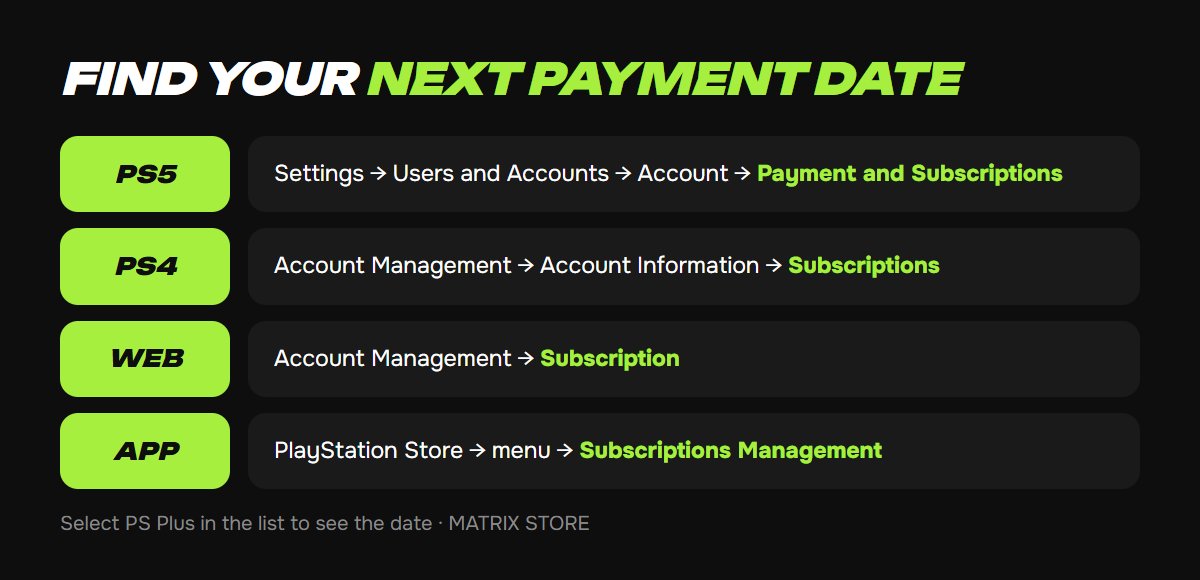
Open your subscriptions list, select PS Plus, and check the next payment date:
- PS5: Settings → Users and Accounts → Account → Payment and Subscriptions → Subscriptions.
- PS4: Settings → Account Management → Account Information → Subscriptions.
- Web: sign in to Account Management and select Subscription.
- PlayStation App: tap the PlayStation Store icon, then the menu icon at the top right, then Subscriptions Management.
That date is when your subscription renews, or when it ends if you've canceled.
What gets charged at renewal
Renewal draws on your PSN wallet first. Since September 2024, if the wallet can't cover the price, Sony charges the shortfall to your default payment method. The old Auto-Add Funds setting is gone.
A few days before the date, it's worth checking your wallet balance and confirming that your card is current. An expired card is one of the most common reasons a renewal doesn't go through.
Getting close to your date? See the PS Plus options in the Matrix Store subscriptions section.
Turn off renewal and keep your time
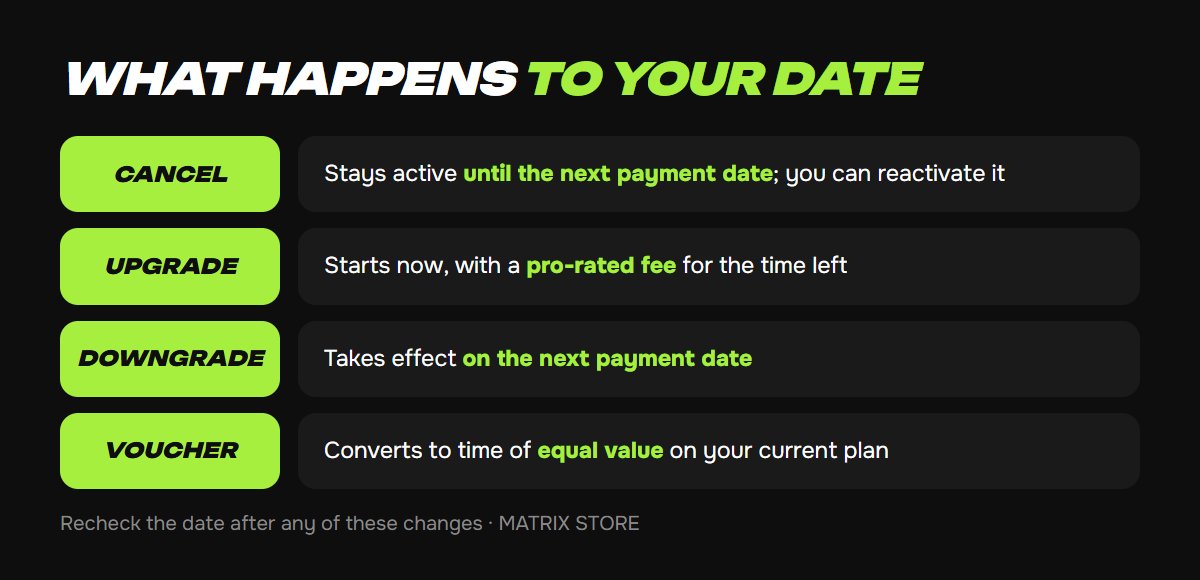
On PS5, open the subscription and select Cancel Subscription. Nothing shuts off right away: Sony deactivates the subscription starting from the next payment date. Changed your mind? Select Reactivate Subscription. For every platform and the refund rules, read our guide to canceling PS Plus auto-renew.
How plan changes and vouchers affect your time
Upgrading takes effect now. You pay a pro-rated fee for the time left until your next payment date: with half your term remaining, you pay half the price difference between the plans. On the next payment date, you're charged the standard price of the higher plan.
Stacked subscriptions raise that bill. If you bought several terms in a row, Sony upgrades all of that time at once, so the fee can be larger than you'd expect.
Downgrading takes effect on your next payment date. Until then, you keep your current plan's benefits.
Vouchers convert to time of equal value on your current plan. An Essential voucher applied to a Premium subscription, for example, buys less time than the label suggests. To use it on a different plan, change plans before you redeem the code.
After any of these, reopen the subscription and confirm the new date.
Review past charges
If a charge looks unfamiliar, check your transaction history:
- PS5: Settings → Users and Accounts → Account → Payment and Subscriptions → Transaction History.
- Web: Account Management → Transaction History. It defaults to the past two years, and you can request a refund from a transaction's details.
- PlayStation App: PlayStation Store icon → menu icon → Transaction History.
Refund eligibility is limited, so read our guide to PS Store refunds before you ask.
What ends with your subscription
Monthly Games and the Game Catalog stop launching until you resubscribe, and anything that requires PS Plus, such as online multiplayer in many games, closes too. Games you bought outright stay yours. If you keep saves in cloud storage, download them to the console while your subscription is still active.
Don't want to deal with it?
We'll set up PS Plus on your account and help you choose a plan. Pay with USDT. Questions? Message us in the bot @matrix_eng_bot or our manager on Telegram.