
How to listen to music while gaming on PS5: set up Spotify or Apple Music, control tracks mid-game, and play music from USB
2026-11-06 · Guides
Quick answer: Sony officially supports two music services on PS5, Spotify and Apple Music. Download the app from Media → All Apps, sign in, then control everything from PS button → Music. The music keeps playing over your game, and the media card gives you pause and skip. If your service isn't supported, you can still play your own files from a USB drive.
Which services work
Sony's PS5 music support page names only Spotify and Apple Music. Spotify has been on PS5 since launch, and Apple Music arrived on October 27, 2021. Sony also notes that both are available only in certain countries and regions.
Your Spotify or Apple Music account is separate from PSN. The app links to your PS5, and the music service sets its own plan terms.
There's no dedicated YouTube Music app on Sony's list.
Set it up in four steps
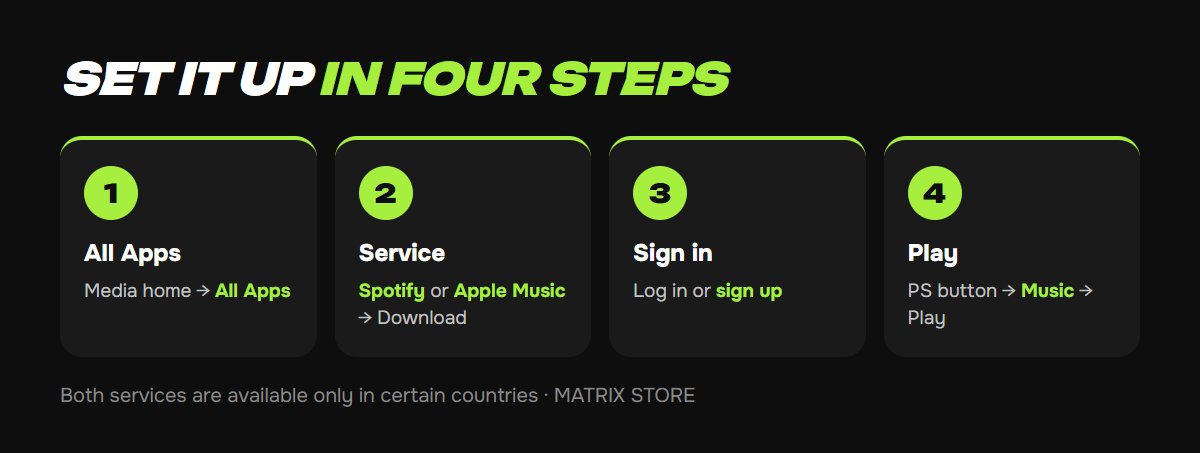
1. On the home screen, go to Media and select All Apps.
2. Pick Spotify or Apple Music and select Download.
3. Open the app and follow the on-screen prompts to log in or sign up. The app links with your PS5.
4. Press the PS button, select Music, choose a song, album, playlist, or podcast, and select Play.
You can start music before launching a game or in the middle of one. It keeps playing when you jump back in.
Got the soundtrack sorted? Pick a game from the Matrix Store catalog, on your account or through Game Sharing.
Controls mid-game
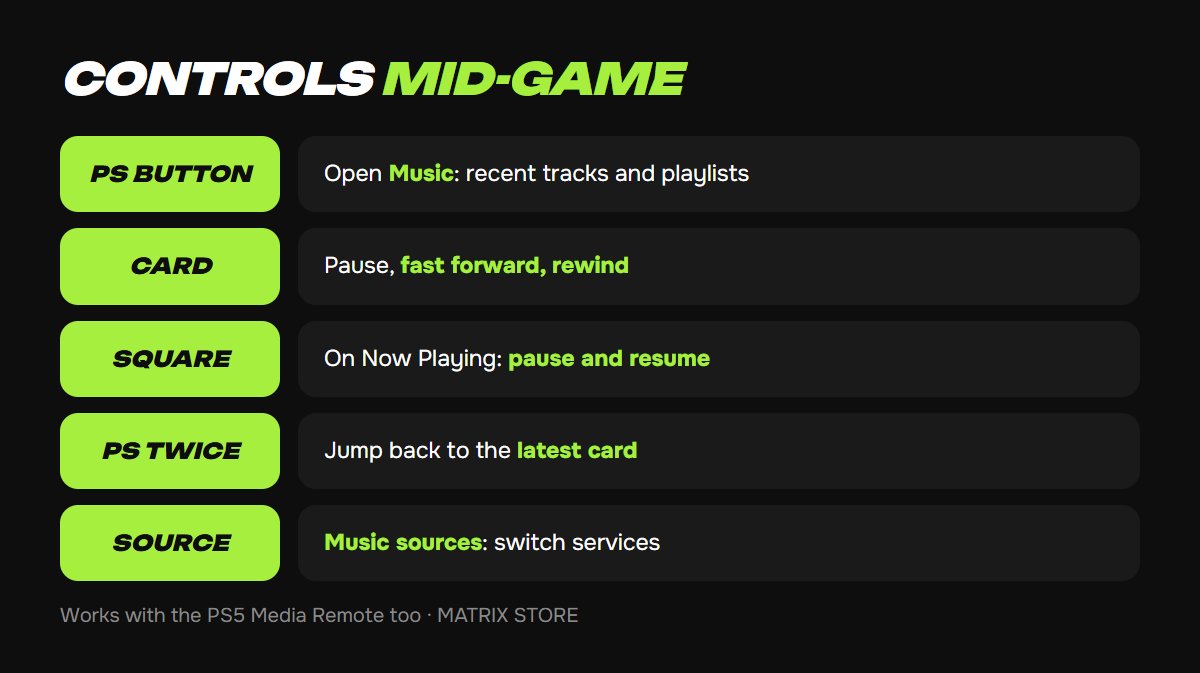
PS button → Music shows recently played tracks, playlists, and podcasts.
The track card in the control center gives you pause, fast forward, and rewind.
Square on the Now Playing card pauses and resumes without opening anything else.
Press PS twice to jump to your most recent card.
Music sources lets you switch between services.
The PS5 Media Remote works too, if you have one.
Volume is easiest from the Sound icon in the same menu. You can move Music and Sound to the front of the row: see our guide to customizing the PS5 control center.
If your service isn't supported
Play music from USB. PS5 plays MP3, AAC, and FLAC files from a USB drive through Media Gallery, controlled from the same control center. Our USB video and music guide covers drive format and folder setup.
Song-change pop-ups getting old? Turn off the Song Change type under Settings → Notifications. Our PS5 notifications guide has the full list.
FAQ
The game's soundtrack clashes with my playlist. Most games let you lower their music volume in audio settings while keeping dialogue and effects.
The app wants a subscription. Free and paid plan rules come from the service itself. Check Spotify's or Apple's website.
The app won't work. Make sure the service is available in your country. Sony notes it isn't everywhere.
Don't want to deal with it?
We'll help with console setup and pick a game for your account or through Game Sharing. Pay with USDT. Questions? Message us in the bot @matrix_eng_bot or our manager on Telegram.